Walk into the first session with a map of where to look.
Your client completes a 14-area neurodivergence screening at home, on their own device. You get a structured Specialist Briefing, with the profile, reliability checks, confounds and differential considerations. It is stored in an encrypted archive that only you can open.
Adults, children 7–10 and young people 11–13 · assessment in any of 12 languages · the app runs in Chrome or Edge on a computer. Cancel anytime; invites cost nothing until completed.
Already subscribed? Open Omniprism Practice →
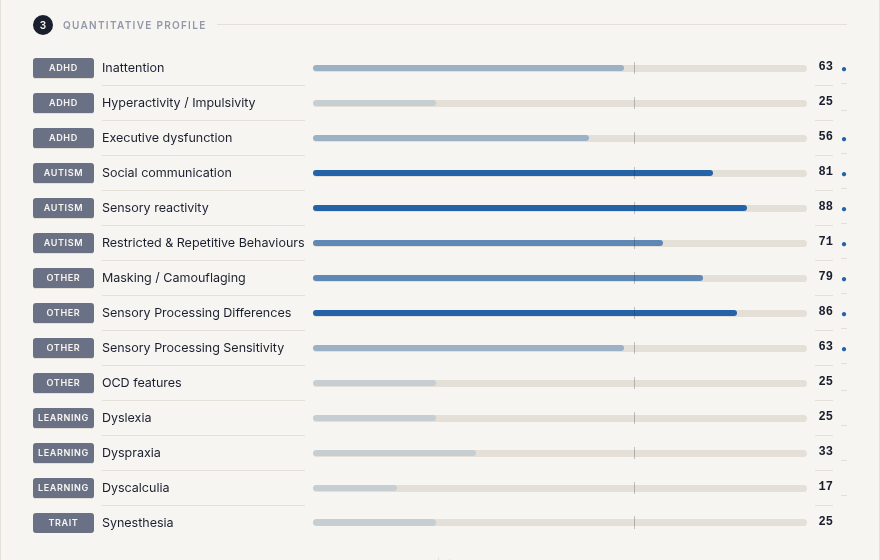
- 14 areasADHD, autism, learning differences, sensory processing, OCD features and more
- 12–15 minfor your client, on any device, with no account
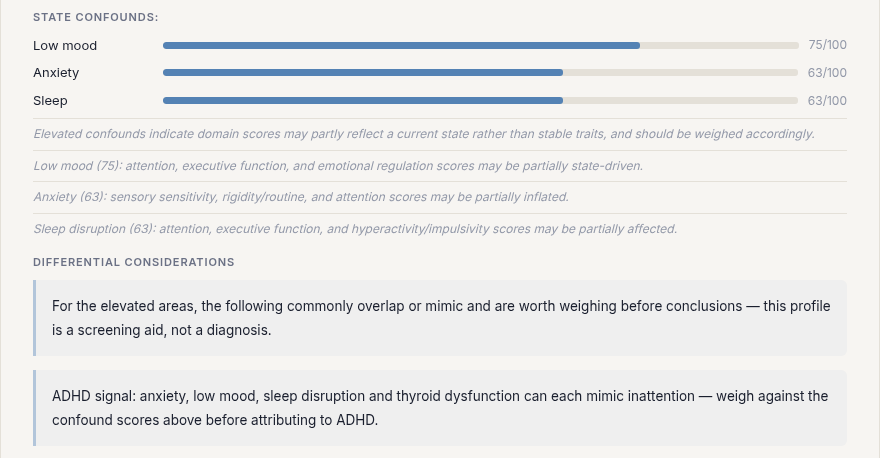
- 2 + 3 checkstwo on answer quality, three on mood, anxiety and sleep as state confounds
- 0 answersever reach our servers, not even encrypted
A starting point you can read in five minutes, and question.
The briefing does the groundwork before the first session, and it shows its own weak spots so you know how far to trust it.
The whole profile
Fourteen areas on a 0–100 self-report scale, with a fixed threshold, cluster aggregates, functional impact and developmental history.
Reasons to doubt it
An attention check and an infrequency check, plus low mood, anxiety and sleep as state confounds. Each elevated area gets its differential considerations.
Every answer, item by item
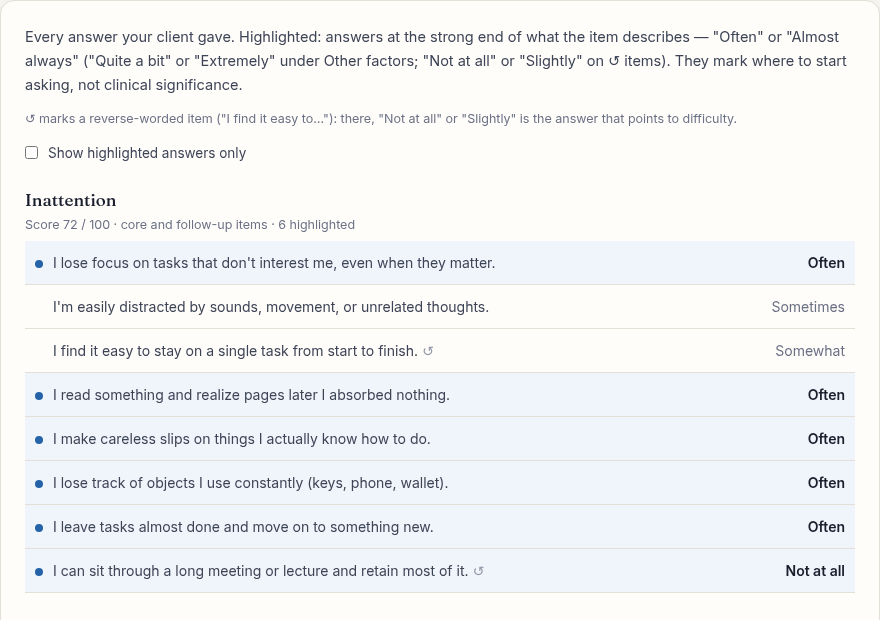
Answers at the strong end are highlighted and reverse-worded items are marked. You see where to start asking, not just a total.
Change over time
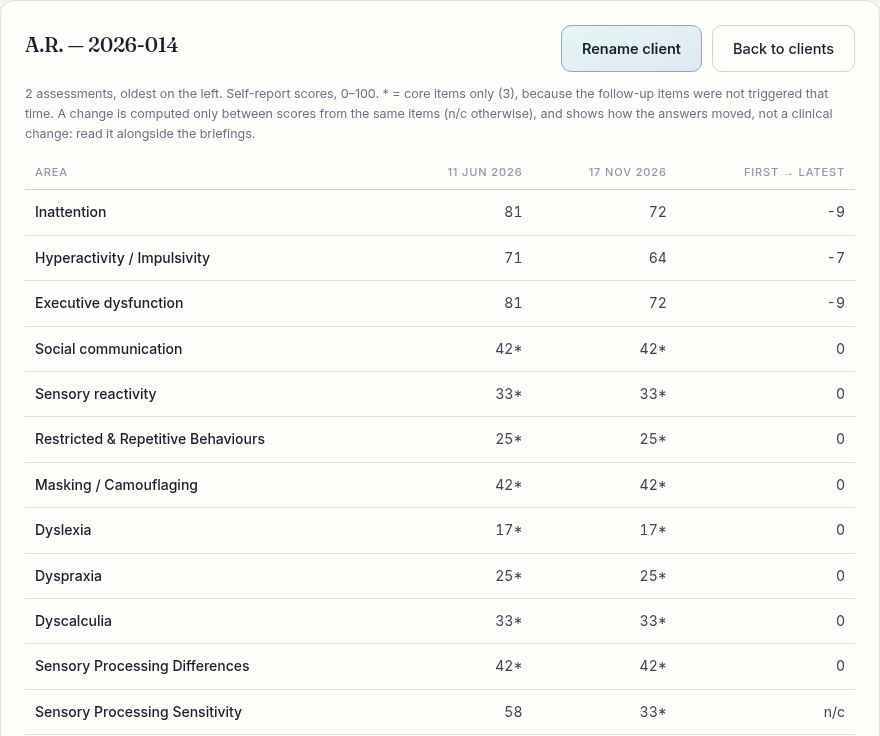
Invite the same client again and their assessments line up by date. A change is computed only between scores built from the same items.
Your notes, your report
Private notes on each assessment, plus a plain-text summary built from the briefing's own figures, ready to paste into your report.
Print or save as PDF
Every briefing prints cleanly for the file. It works offline too: once installed, the app opens without a connection.
The assessment and the Specialist Briefing were developed with Caroline Ricci, clinical neuropsychologist and co-founder of Omniprism. The free version is available in twelve languages; Practice brings the same instrument into the consulting room. Read the methodology.
The real app, with fictional clients.
These are screenshots of Omniprism Practice, not mock-ups. Each one opens live in the demo, where you can click through four fictional clients.
Try the whole app in the demo → · or open a complete sample Specialist Briefing ↗
Four steps, no accounts for your client.
-
Create an invite
One click in the Practice app. Label it with initials or a case code, since the app never needs a real name.
-
Your client takes it at home
They open the single-use link on their phone or computer and answer in 12–15 minutes. Their answers stay on their device.
-
The result comes back sealed
One "Send to" button gives you an encrypted file that only your app can open. Save it to your inbox folder and it imports itself.
-
Read, compare, annotate
Open the briefing, check the answers, set it beside an earlier assessment, add your notes. All of it stays on your computer.
Send the invite when you book the first appointment. By the day of the session the briefing is in your archive, and the hour can go to the person rather than the questionnaire.
We never hold your clients' data. Not even encrypted.
Practice was built so that there is nothing to keep: no copy of your clients' data for us to lose or hand over.
- The assessment is scored on your client's own device.
- The result is sealed with your app's key before anything leaves that device.
- Your archive lives in a folder you choose, encrypted with a passphrase only you know. Put it in Dropbox, OneDrive or on a NAS and it syncs like any folder, still encrypted. Keep exporting backups too.
- Our server only knows that your licence exists, and that invites were created and completed. It never knows who your client is, or a single answer.
The other side of this: we cannot recover a lost passphrase. The app reminds you to export a backup whenever there is something new to protect.
What it covers today.
Included now
- Adult edition (18 and over)
- Youth editions for children 7–10 and young people 11–13, completed with a parent or guardian, with the Youth Briefing
- Client assessment in any of 12 languages, chosen by the client
- Practice app in English, Italian, Spanish and French; the Specialist Briefing in English
- Practice app in Chrome or Edge on a computer (Windows, macOS, Linux); both are free to install
- Your client can use any modern browser, on a phone or a computer
- Your card in Find a professional, the directory people reach from their free test results: one paid month keeps you listed for twelve months
On the way
- Extra assessments you can buy on top of your plan
Pay for completed assessments, not for seats.
Every plan includes the whole app. The only difference is how many assessments your clients can complete.
Practice 5
For an occasional referral stream
5 completed assessments a month · €5.00 each
60 completed assessments a year · €4.17 each
- Specialist Briefing for every assessment
- Answers, notes, summary, comparison
- Encrypted archive and backups
Practice 10
For a regular flow of new clients
10 completed assessments a month · €4.00 each
120 completed assessments a year · €3.33 each
- Everything in Practice 5
- Room to re-assess clients over time
- Upgrade or downgrade anytime
Practice 20
For a busy practice
20 completed assessments a month · €3.50 each
240 completed assessments a year · €2.92 each
- Everything in Practice 10
- The lowest price per assessment
- Room to re-assess a full caseload
- An assessment counts only when your client finishes it. Invites that are never used cost nothing.
- Your allowance resets each month, or each year on annual, and unused assessments do not carry over. On annual it is one pool for the whole year. Need more in a busy month? Switch to a larger plan from your Gumroad library.
- Your usage and your renewal date are always on screen in the app.
- Cancel anytime. Your archive stays on your computer, readable and exportable: records are never locked when you cancel.
- Each plan is for one practitioner and one archive.
Prices in euro, excluding VAT, which Gumroad adds at checkout where it applies. Your licence key arrives by email straight away.
Before you decide
Can I try it before I subscribe?
There is no free trial. You can try the app in the demo with fictional clients, open the complete sample briefing, or take the free version yourself: your clients answer the same adult instrument. Then start monthly and cancel anytime.
What about GDPR and a data processing agreement?
We never receive your clients' answers or results, so no client data passes through us: the records live only in your archive, under your control as the practitioner who collects them. Our server holds billing metadata only (your licence, and counts of invites created and completed). Payment is handled by Gumroad. Use a code or initials as the client label and the app never holds a name either.
Is this a diagnostic instrument?
No. It is an educational, self-report screening, and the briefing says so on its first page. Scores use fixed thresholds, not clinical norms. It is meant to organise what your client reports so you know where to look, never to replace your assessment or your judgement.
What exactly does Omniprism see?
That your licence is valid, and that an invite was created and completed, which is how your allowance is counted. Never your client's name, label or answers, and never the result file. Your name and results email travel inside the invite link itself, in a part that browsers do not send to any server.
How does the result get to me?
At the end of the assessment your client presses "Send to" with your name on it. On phones the share sheet opens with the encrypted file attached. Elsewhere the file is saved and an email to you is prepared. Save the file into your archive's inbox folder, or set an email rule to do it, and the app imports it on its own.
What if I lose my passphrase?
Without the passphrase and without a backup, nobody can open the archive, us included. That is the price of not holding your data. The app asks you to export a backup when you set it up and reminds you whenever there are new assessments since the last one.
What happens if I cancel?
You can no longer send new invites, but everything already in your archive stays readable, printable and exportable on your computer. Nothing is deleted and nothing is locked.
Can I change plan later?
Yes. You can move between Practice 5, 10 and 20, monthly or annual, from your Gumroad library. Your archive is unaffected.
Do I get an invoice?
Gumroad emails a receipt for every payment, with your licence key on the first one.
Use it with your next new client.
Set up takes about five minutes. Send the first invite today and read the briefing before you meet.
Coaches and teams: see the other professional editions.